▤
Detailed Data
See the key information captured for every access event.
Username
Device Controlled
Command Type
Timestamp
Duration
Connection Method
Success / Rejected


Login to the management console to manage all user accounts & vehicle license plates.
Check access logs and export to CSV & PDF for auditing.
Save open and close times for the gate to open automatically.
Run reports and export for site analysis.
Automatic gate access control with no admin via the secure API.
EASY ADMINISTRATION
EFFORTLESS SCHEDULING
AUDITING MADE SIMPLE
Track every action, analyse patterns, and keep your operations running smoothly with insights from the last 30 days. Easily filter and export by date periods to PDF & CSV.
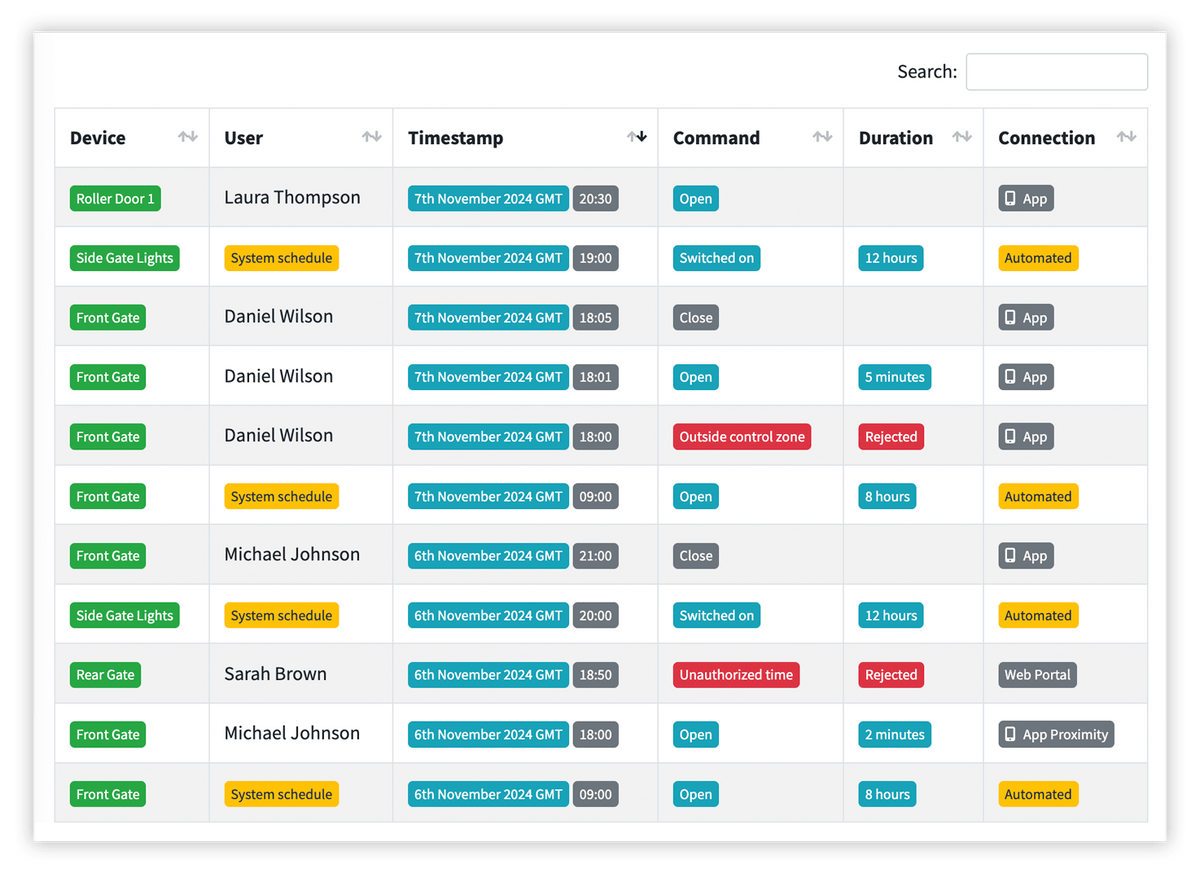
See the key information captured for every access event.
Review recent activity and keep a clear audit trail of what happened on site.
Export your access logs for auditing, reporting and deeper analysis.
EVERYTHING RECORDED
Track every action, analyse patterns, and keep your operations running smoothly - all with insights from the last 30 days.

Automate gate access by generating user access when bookings are made.
Seamlessly integrate with third party booking systems for full control & flexibility.
Optimised for automation platforms, web services & custom applications
Token based access ensures only approved systems can connect.
CONTROL FROM YOUR DESK
SYSTEM CUSTOMISING
DIGIGATE PRODUCT OPTIONS
The digiGate Management Console is accessed through a secure web browser using your system's unique web address (Connect Code). Simply enter your credentials to manage your system. There's no specialist software to install, and the console works across desktop computers, laptops, tablets and smartphones.
Yes. The digiGate Management Console is hosted directly on your digiGate Pro hub, meaning it can be accessed locally over your site's network, even without an active internet connection. This allows administrators to continue managing their system locally during an internet outage.
Absolutely. Provided your digiGate Pro system has an active internet connection, authorised administrators can securely access the Management Console from anywhere in the world. Whether you're working from home, travelling or managing multiple business locations, you can make changes without physically visiting the installation.
Yes. digiGate has been designed with simplicity in mind, providing an intuitive, modern interface that doesn't require specialist technical knowledge. Everyday tasks such as adding users, managing number plates, creating schedules and reviewing access logs can all be performed through a straightforward web interface, without complicated programming or SMS commands.
The Management Console gives you centralised control over your entire access system. You can add, edit and remove users, manage authorised vehicle registrations, create access schedules, configure permission groups, manage Virtual PIN Codes, review and export access logs, operate connected entrances and configure system settings. Everything is managed from one convenient web interface.
Traditional GSM diallers can be cumbersome to manage, often relying on SMS commands or manual programming to update users. Similarly, some standalone ANPR systems require separate camera interfaces or software for managing authorised number plates.
digiGate Pro brings everything together into one intuitive web-based platform. Manage users, vehicle registrations, schedules, permissions and access logs centrally, regardless of whether someone accesses your site through ANPR, App, Call to Control, WhatsApp or Virtual PIN Codes. No juggling multiple management platforms or complicated device configurations.
Yes. digiGate supports multiple connected receivers and entrances, allowing administrators to configure and control different gates, barriers, doors and other access points through one Management Console. Individual users can also be assigned permissions for specific entrances, ensuring they only have access where required.
Yes. digiGate offers flexible access permissions, allowing administrators to determine which entrances each user can operate and when. You can create weekday schedules, temporary date-based access or assign users to permission groups, making it easy to accommodate different departments, tenants, visitors and contractors.
Yes. Authorised vehicle registrations can be added, edited, disabled or removed directly through the Management Console. You can also assign individual access schedules, organise number plates into groups and review ANPR activity, all without needing to log into a separate camera management interface.
Yes. digiGate maintains detailed access logs, allowing administrators to review who operated an entrance, when it happened and which access method was used. Logs can be searched, filtered and exported for reporting purposes, providing greater visibility and accountability across your site.
Yes. digiGate supports permission groups, allowing administrators to organise users into departments, teams or access categories. For example, you could create separate groups for reception staff, cleaners, contractors and management, each with different entrance permissions and schedules. Changes can then be managed at group level rather than updating every user individually. Enterprise license required for grouping functionality.
Yes. The Management Console allows you to configure automatic schedules for connected entrances. For example, a business park barrier could be configured to open automatically during normal business hours and return to controlled access outside those times. You can also configure holidays and temporary schedule pauses to accommodate changes in site operations.
Yes. digiGate supports different administrative roles and permissions, allowing you to delegate management responsibilities without giving everyone unrestricted access. For example, a site manager could manage the entire installation, while a department administrator could be restricted to managing users within their assigned permission group.
Yes. digiGate Pro offers Booking API integration, allowing compatible booking and reservation platforms to automatically create, update and remove access permissions. This is particularly useful for hotels, holiday parks, parking facilities and storage sites, where access can be linked directly to a customer's booking and automatically expire when their reservation ends.
All access activity remains visible through the digiGate Management Console, reducing manual administration while maintaining oversight of your site.
No. One of the key advantages of digiGate is that everyday management can be carried out remotely. Provided your system is connected to the internet, you can add users, remove permissions, update schedules, register vehicle number plates and review access logs without travelling to the installation. This is particularly valuable for businesses managing remote sites or locations without permanent on-site staff.
Yes. digiGate Pro supports configurable system event alerts, helping administrators stay informed about important activity without constantly checking the Management Console. Depending on your subscription, notifications can include failed access attempts, communication issues, user lockouts and changes to access permissions or schedules.
This is particularly useful for commercial installations where security and operational oversight are important.


